Verified meeting attendance
Your meeting attendance, on the record.
Present checks you in to an in-person meeting only when you are there while it is happening, and only after Face ID confirms it’s you. You get a signed record that a court, probation officer, or treatment program can check for themselves.
- Download on theApp Store Coming soon
- Get it onGoogle Play Coming soon
Already have a record to check? Verify a record Monitor members? Present for monitors


Verified identity
It’s really them, and they were really there.
A check-in is worth something only if the right person made it. Present checks that at every meeting, and again before anyone sees a record.
-
Face ID on every check-in
Each check-in and check-out needs Face ID, Touch ID, or a fingerprint. The phone’s secure hardware then signs it, and Apple or Google confirms the signing key belongs to the real Present app. Present never sees a face or fingerprint.
-
ID-verified before sharing
Before a member shares with a monitor, Stripe Identity matches a live selfie to their driver’s license, ID card, or passport. The monitor sees “ID verified as” the name on the ID, and the date.
-
Signed and tamper-evident
Every record is digitally signed the moment it is made. Change one detail and the signature fails. Anyone can check a record with its code or QR code.
Present can’t see whose face or fingerprint was on the phone before setup. The ID check is what ties the account to a real person. What a record proves


What it does
Four things, done carefully.
- 1
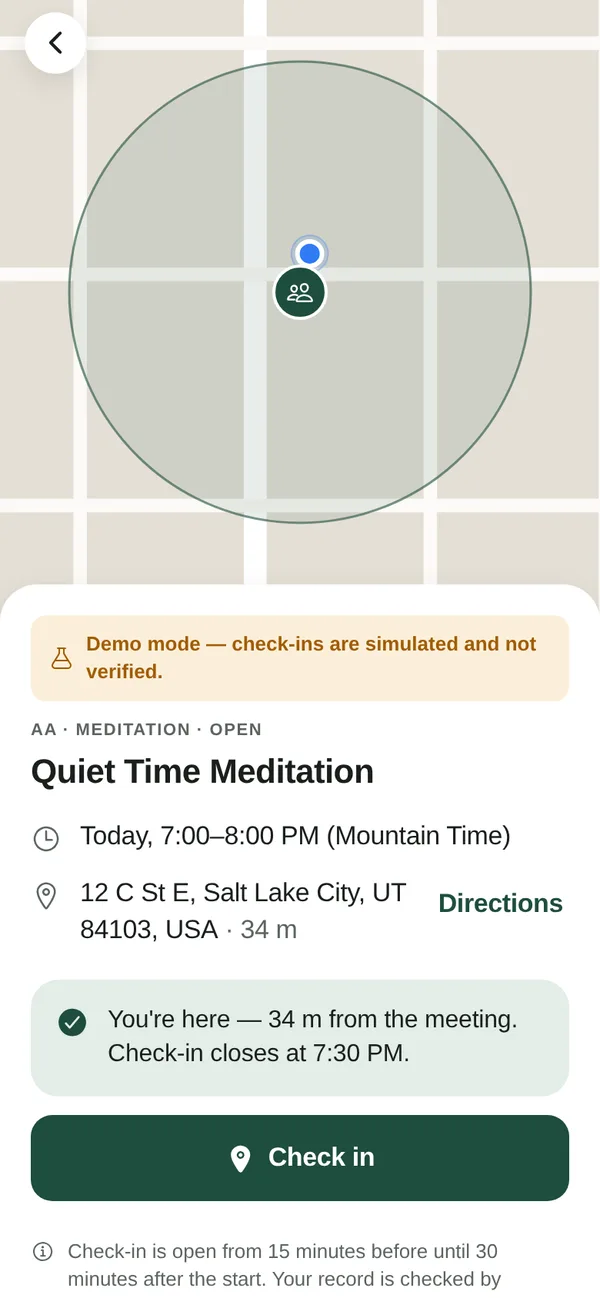
Check in when you are there
Check-in opens 15 minutes before an in-person meeting starts and closes 30 minutes after. You must be within about 200 meters and confirm it with Face ID. Our server checks the time and the distance, not your phone.
- 2
Check out when you leave
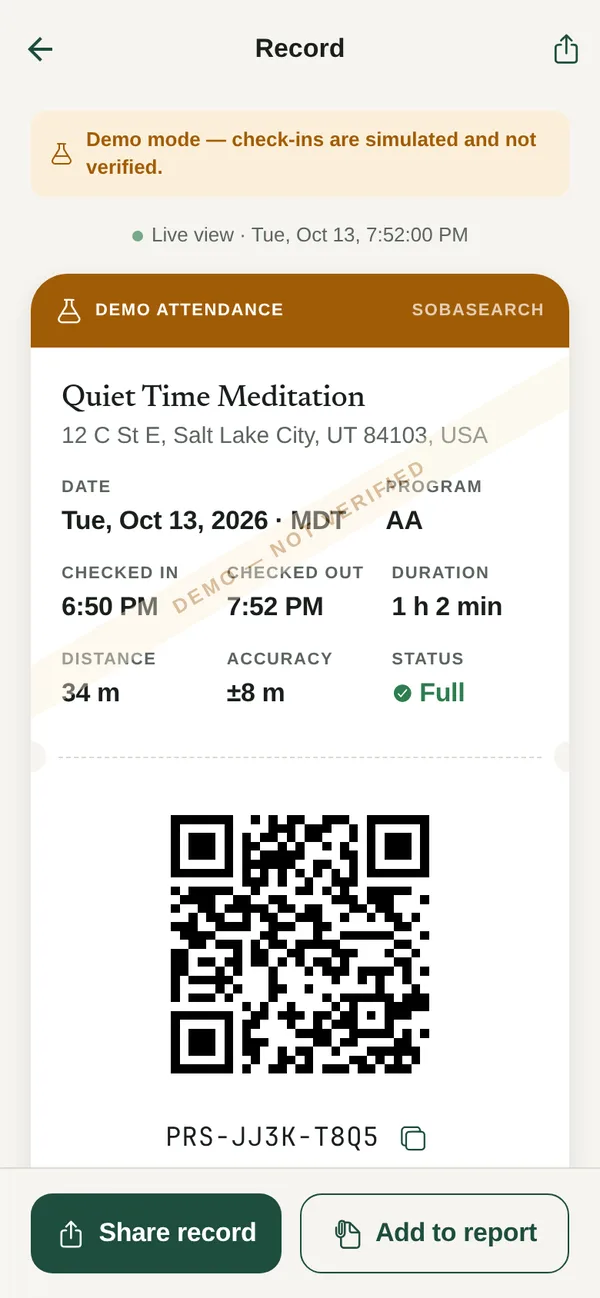
Checking out adds how long you stayed. Stay for at least three quarters of the meeting and the record says Full attendance.
- 3
A signed record
Each check-in becomes a record with its own code and QR code. It is digitally signed and can never be edited, so anyone can tell it is real.
- 4
A streak of meeting days
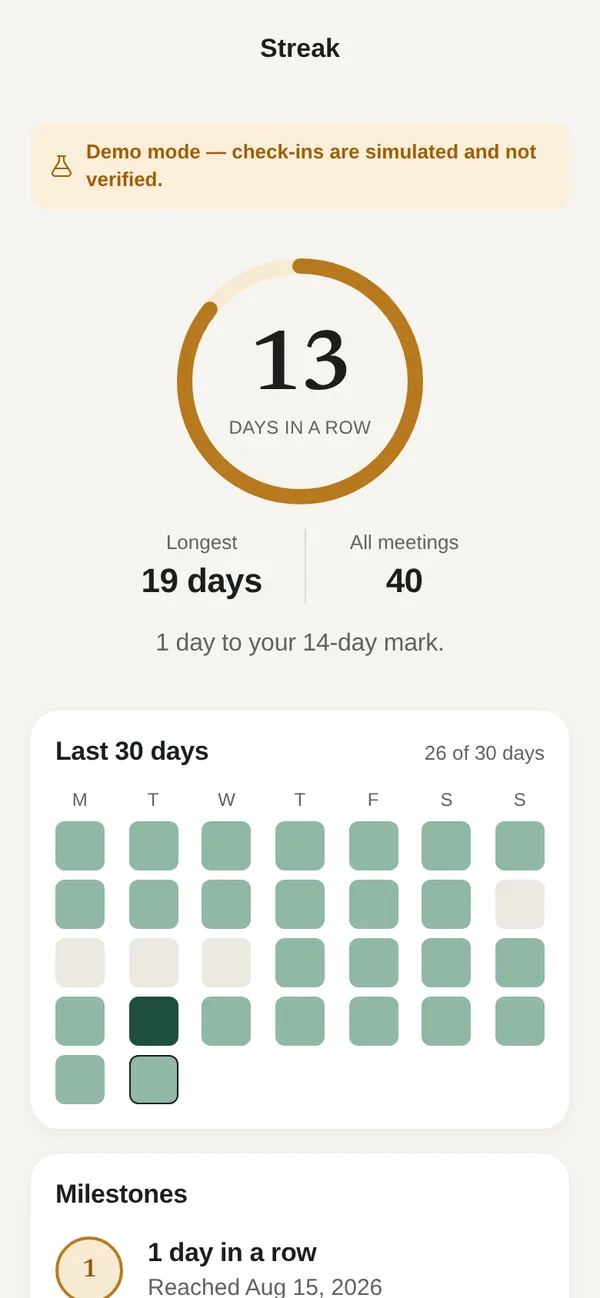
See how many days in a row you have made a meeting, next to your total. A missed day starts a new streak; your total never resets.
- Today
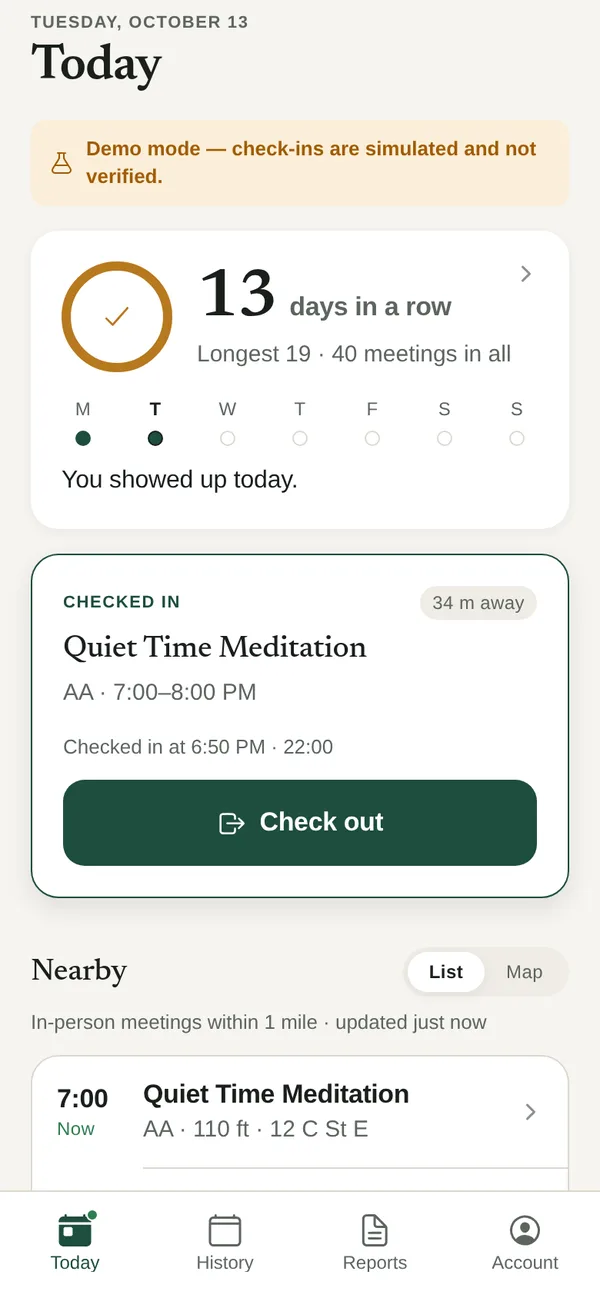
- Check in
- Your record
- Streak
- Report
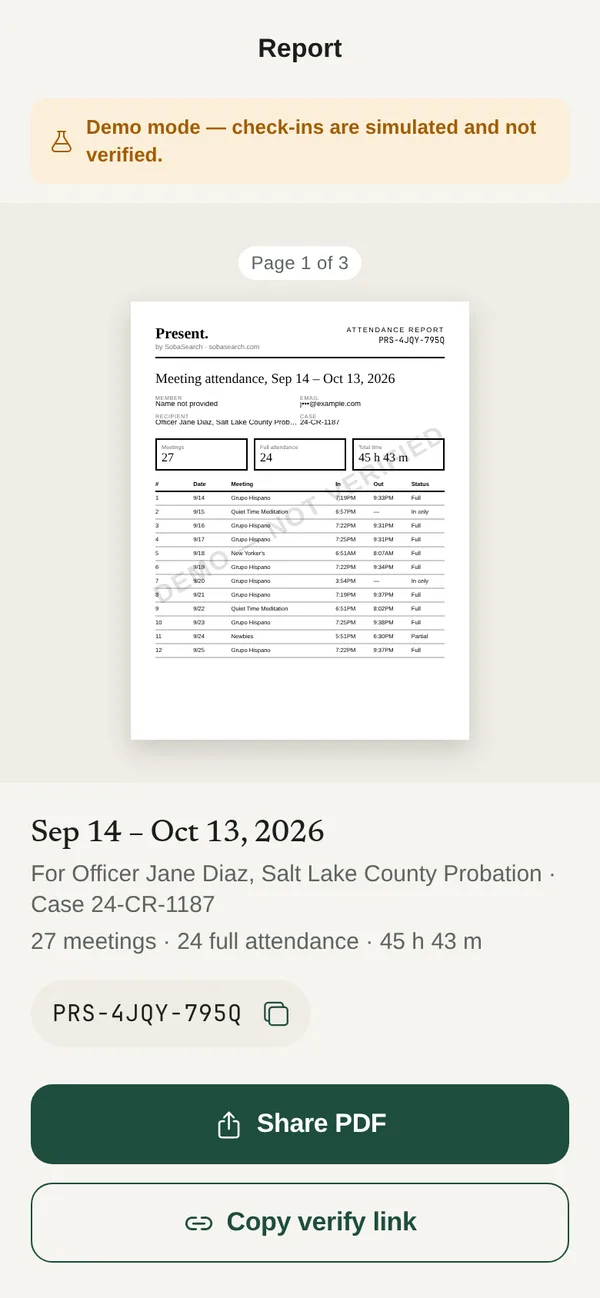


Screens shown from the demo build, which marks records “Demo — not verified.” Real records carry a green header.
For members
Less paperwork. More trust.
No more chasing signatures on a sheet after the meeting. Open the app, tap Check in, and go sit down.
- Private by default. No one sees your records until you share one.
- Reports in a minute. Pick a date range, add who it is for and a case number, and share a PDF or a link.
- Nothing about anyone else. Present records your attendance only. Never other people at the meeting.
- Discreet on your phone. The name and icon never mention a program or recovery.
- Kind about missed days. Your total meetings always sits beside your streak, so a reset never reads as zero.
For monitors
Attendance you can rely on, without the paperwork.
For probation, parole, and pretrial officers, drug courts, treatment programs, and case managers. Members choose to share with you, and can stop at any time.
Pricing
- $10
- a month for each member who shares with you,
- $5
- plus a one-time ID check per member.
Free for members.
- Your caseload. Every member who shares with you, on one page, with their ID check and last meeting.
- Weekly requirements. Set how many meetings a week each member needs, and see who is on track or behind.
- Signed records. Times, distance, and Face ID status for each meeting, each with a public verification code.
- PDF reports. A signed report for any date range, ready for a file or a hearing.
- An access log. Members can see who at your agency opened their records, and when.
For courts, probation, drug courts, and treatment programs
How to check a record.
- Scan the QR code on the record or report with any phone camera. Or go to verifiedpresent.com/verify and type the code, such as PRS-7K3Q-M9XD.
- Look for the green banner: “Verified: issued by SobaSearch and unaltered.” A red banner means the record failed a check. Do not rely on it.
- Compare the details with the paper or screen in front of you: name, meeting, date, and check-in and check-out times.
The verify page needs no account, loads no analytics, and is not listed in search engines. For an independent check, each page includes the signed data and links to our public signing keys.
Verify a record
How verification works
What a record proves, and what it doesn’t.
We’d rather you trust a record for the right reasons. Every verify page spells out the same limits.
A verified record shows
- Our server recorded the check-in and check-out at the times shown, using its own clock, not the phone’s.
- At each step the phone reported a GPS position within 200 meters of the meeting’s listed location, after allowing for GPS accuracy. Our server worked out the distance.
- Check-in happened between 15 minutes before and 30 minutes after the scheduled start.
- The record hasn’t been changed since. Records can only be added to, and each one is digitally signed.
- The phone’s enrolled owner unlocked it with Face ID or a fingerprint at check-in and check-out. The phone’s secure hardware signed each one, and Apple or Google confirmed the key came from the real Present app.
- The member’s identity was verified with a government ID, and when. Stripe Identity matched a live selfie to the photo on the ID. Every member who shares with a monitor has done this.
It does not show
- Whose face or fingerprint was added to the phone before the member set up Present. The ID check matches the member to their ID, but it can’t see what else is enrolled on the phone.
- That the member took part in the meeting, or stayed in the room, between check-in and check-out. We verify presence at the location, not participation.
- That the phone’s GPS wasn’t faked in a way the phone didn’t report. Reported fake locations are refused.
- That the meeting took place as listed. Meeting details come from the SobaSearch directory at the time of check-in.
Privacy and anonymity
As little about you as it takes.
Anonymity matters in recovery. Present was built around it.
- Location only while the app is open. One reading is saved when you check in, and one when you check out. Never in the background.
- Nothing about other attendees. No names, no photos, no nearby phones.
- You hold the key. A record’s code works like a key. Only people you give it to can open it.
- No ads, no selling, no tracking. There are no ad or analytics tools in the app.
- Your email stays private. Shared records show your name and a masked email, like j•••@example.com.
Questions
Common questions.
Does Present track where I go?
No. Present reads your location only while the app is open: to list meetings near you, and once when you tap Check in or Check out. Only the check-in and check-out readings are saved. The app does not even ask for background location.
Which meetings can I check in to?
In-person and hybrid meetings in the SobaSearch directory that have a street address. That includes AA, NA, Al-Anon, SMART Recovery, and many more. Online-only meetings can’t be verified by location, so they are not eligible.
What if I arrive late?
You can check in until 30 minutes after the scheduled start. After that, check-in closes for that meeting. This keeps records honest for everyone.
What if I forget to check out, or my phone dies?
Your record still shows that you checked in. It will say “Checked in only” and won’t count as full attendance. You can check out until an hour after the meeting ends.
Can I delete or change a record?
No one can edit a record, including us. That is what makes it trustworthy. If something is wrong, email us and we will look into it. Corrections are added as new signed entries, never by editing the original. You can delete your whole account in the app (Account, then Delete account). That erases all your records and reports, and anyone who opens a code you shared will see that it was deleted at your request.
Do I have to use Face ID?
Yes. Present needs Face ID, Touch ID, or a fingerprint, and asks for it every time you check in or out. That way each record shows the phone’s enrolled owner checked in, not just that the phone was there. Your face and fingerprints never leave your phone; Present only learns whether the check passed. If your phone has none set up, open your phone’s Settings and add a face or fingerprint first. Phones without Face ID, Touch ID, or a strong fingerprint sensor can’t use Present.
Does Present check who I am?
Yes, in two ways. Face ID or a fingerprint confirms that your phone’s owner made each check-in. Before you share with a monitor, a one-time ID check confirms who that owner is: our partner Stripe asks for a photo of your driver’s license, ID card, or passport and a live selfie, and compares the two. You agree to this on a consent screen first. You don’t need the ID check to use Present on your own.
What do you do with my ID photos?
We never receive them. Stripe keeps the photos of your ID and your selfie. Present keeps only your name as printed on the ID, your birth year, the type of ID, the country that issued it, its expiry date, and whether the check passed. Never your ID number or your full date of birth. When you delete your account, we ask Stripe to erase your ID check, photos included. Your monitor sees “ID verified as” your name and the date.
Who pays for the ID check?
The agency you share with. You never pay for Present or for the ID check. A check counts for two years.
Will my court or program accept it?
We can’t promise that. Every court, office, and program decides for itself. Show them this page and ask before you rely on Present.
Is the streak about staying sober?
No. It counts days you went to a meeting, nothing else. It never asks about, or records, anything else about your life.
Will people know what the app is for?
The app is called Present. Its name, icon, and notifications never mention a program or recovery.
What if a meeting’s details are wrong?
Listings come from meeting groups and public sources, and sometimes they are out of date. Email hello@sobasearch.com and we will look into it.
Do I need a SobaSearch account?
No. You create a Present account in the app with your email and a password. It is separate from SobaSearch, even if you use the same email, and Present never sees a SobaSearch account. If you forget your password, tap Forgot password? on the sign-in screen and we will email you a link.

Coming soon to iPhone and Android.
You'll create a Present account in the app. Questions in the meantime? Email hello@sobasearch.com.
- Download on theApp Store Coming soon
- Get it onGoogle Play Coming soon